---
title: Distributor Creation
description: How to create a Distributor and set the account for MyDistributor
---
[Skip to content](https://support.axiosint.com/knowledge/distributor-creation#main-content)
[More support](https://support.axiosint.com/knowledge/kb-tickets/new?hsLang=en)
[](https://support.axiosint.com/knowledge?hsLang=en)
Open main navigation
Close main navigation
- [More support](https://support.axiosint.com/knowledge/kb-tickets/new)
- [Go to axiosint.com](https://axiosint.com/)
[Go to axiosint.com](https://axiosint.com/)
Welcome to Axios Digital University.
- There are no suggestions because the search field is empty.
1. [Axios Digital University](https://support.axiosint.com/knowledge?hsLang=en)
2. [PMS User Guide](https://support.axiosint.com/knowledge/pms-user-guide?hsLang=en)
3. [Entity Management](https://support.axiosint.com/knowledge/pms-user-guide?hsLang=en#entity-management)
# Distributor Creation
## How to create a Distributor and set the account for MyDistributor
#### Table of Contents
[Creating a Distributor](https://support.axiosint.com/knowledge/distributor-creation#A)
[Account Creation](https://support.axiosint.com/knowledge/distributor-creation#B)
[Resetting Password](https://support.axiosint.com/knowledge/distributor-creation#C)
---
### Creating a Distributor
1. Navigate to **Distributors**
2. Add a new Distributor
3. Complete name of the Distributor
4. Distributor location: country, area, address, city, zip code (if applicable)
5. Distributor contact info: name, email address, phone number – *make sure to select the appropriate country code*
6. Upload the Memorandum of Understandin) and any other document – *if an MOU is not needed for your Program, you may upload* [*this PDF*](https://axiosinternational.sharepoint.com/:b:/s/myAxios/EfVyN4NCPMhKrQo7NBbnf2gBigG_Eee1GPGKeWOol8W6pQ?e=4HjJWk)
7. Check for Duplicates and Save if there are no exact matches
**[Back to Top](https://support.axiosint.com/knowledge/distributor-creation#top)**
---
### Setting up access for your Distributor

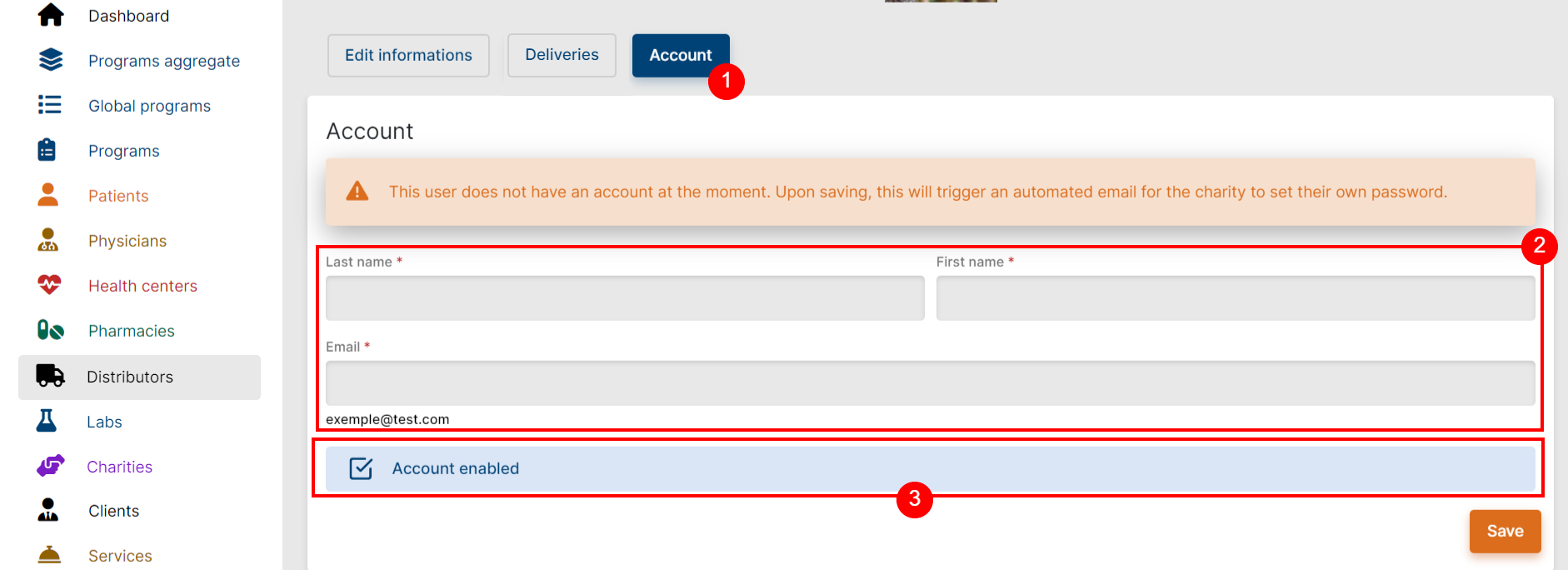
1. Navigate to **Distributors \> Account**
2. Enter the Distributor contact's first name, last name, and email
3. Make sure the checkbox “Account enabled”
1. If the red disclaimer “This user does not have…” displays, then the Distributor’s account is not enabled, and no email will be sent to set their password.
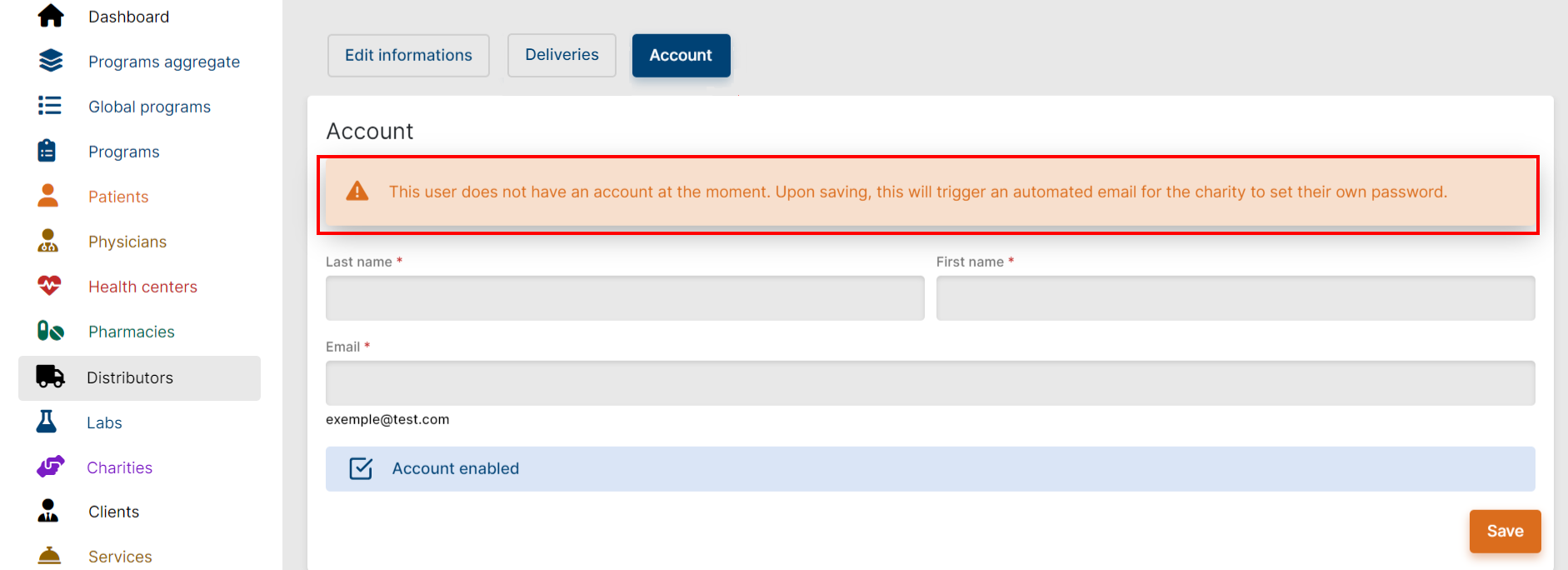
4. Save
Once the Distributor’s account is enabled, the PMS will automatically send an email to them for them to set their own password. Once Distributors have set their own password, they can log into the Platform. Their username will be their email address, and their password the one they have just set.
**IMPORTANT**
Note that the Distributor is also consenting to Axios Privacy Policy by signing in to the Platform.
[**Back to Top**](https://support.axiosint.com/knowledge/distributor-creation#top)
---
### Reset the Distributor’s password
If a Distributor ever forgets their password, they can avail of the “Forget Password” button on the landing screen of the Platform. This will trigger an automatic email to reset the password.
Alternatively, Axios can trigger an automatic email from the Distributor’s Account tab in the PMS, or generate a password reset link to be shared with distributor.
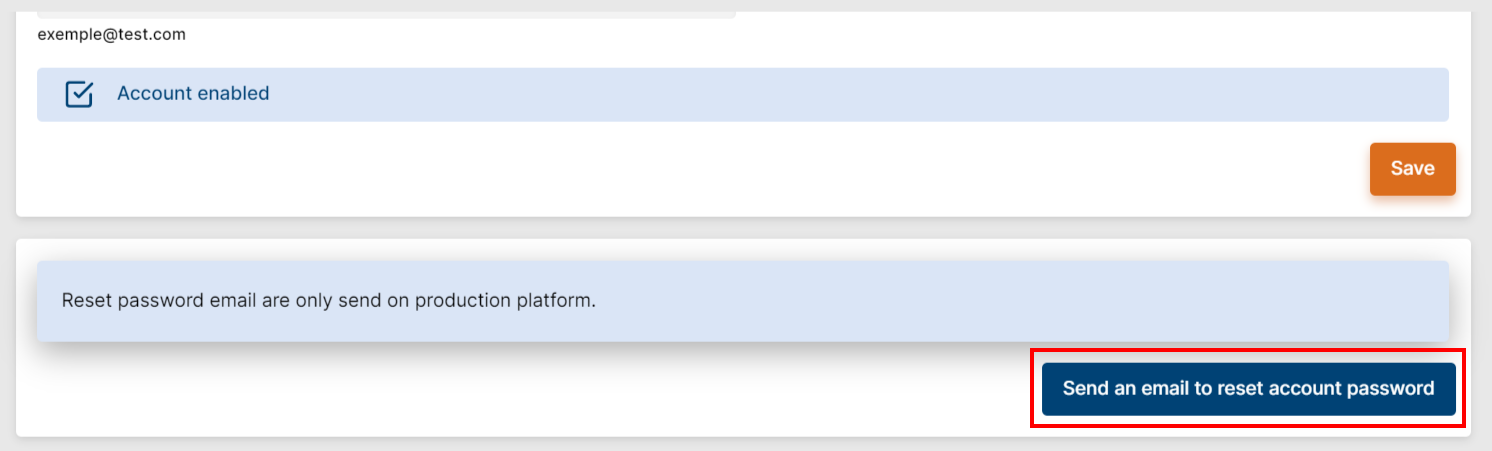
**IMPORTANT**
The link in the reset email is only valid for **one hour**.
After that delay is passed, a new reset email will be needed.
**Good to Know**
A Distributor can only have one email address associated with their account.
In case the Distributor must change their email account to use the app, please contact [pms.support@axiosint.com](mailto:pms.support@axiosint.com) to assist with the change.
**[Back to Top](https://support.axiosint.com/knowledge/distributor-creation#top)**
---
**Going Further**
Learn more about product distribution in our dedicated articles [Product Delivery & Stock Out](https://support.axiosint.com/knowledge/product-delivery-stock-out?hsLang=en) and [Product Delivery Process](https://support.axiosint.com/knowledge/product-delivery-process?hsLang=en)
- [PMS User Guide](https://support.axiosint.com/knowledge/pms-user-guide?hsLang=en#main-content)
- [Glossary & Definitions](https://support.axiosint.com/knowledge/pms-user-guide?hsLang=en#glossary-definitions)
- [General Knowledge](https://support.axiosint.com/knowledge/pms-user-guide?hsLang=en#general-knowledge)
- [Program Configuration](https://support.axiosint.com/knowledge/pms-user-guide?hsLang=en#program-configuration)
- [Program Management](https://support.axiosint.com/knowledge/pms-user-guide?hsLang=en#program-management)
- [Patient Management](https://support.axiosint.com/knowledge/pms-user-guide?hsLang=en#patient-management)
- [Entity Management](https://support.axiosint.com/knowledge/pms-user-guide?hsLang=en#entity-management)
- [Axios+ User Guide](https://support.axiosint.com/knowledge/axios-user-guide?hsLang=en#main-content)
- [MyPrograms](https://support.axiosint.com/knowledge/axios-user-guide?hsLang=en#myprograms)
- [MyPatients](https://support.axiosint.com/knowledge/axios-user-guide?hsLang=en#mypatients)
- [MyHealth](https://support.axiosint.com/knowledge/axios-user-guide?hsLang=en#myhealth)
- [MyHealth (v2)](https://support.axiosint.com/knowledge/axios-user-guide?hsLang=en#myhealth-v2)
- [MyPharmacy (Mobile App)](https://support.axiosint.com/knowledge/axios-user-guide?hsLang=en#mypharmacy-mobile-app)
- [MyPharmacy (Desktop App)](https://support.axiosint.com/knowledge/axios-user-guide?hsLang=en#mypharmacy-desktop-app)
- [Digital University Sessions](https://support.axiosint.com/knowledge/digital-university-sessions?hsLang=en#main-content)
- [Season 1](https://support.axiosint.com/knowledge/digital-university-sessions?hsLang=en#season-1)
- [Season 2](https://support.axiosint.com/knowledge/digital-university-sessions?hsLang=en#season-2)
- [Season 3](https://support.axiosint.com/knowledge/digital-university-sessions?hsLang=en#season-3)
- [Season 4](https://support.axiosint.com/knowledge/digital-university-sessions?hsLang=en#season-4)
- [Season 5](https://support.axiosint.com/knowledge/digital-university-sessions?hsLang=en#season-5)
- [Season 6](https://support.axiosint.com/knowledge/digital-university-sessions?hsLang=en#season-6)
- [Season 7](https://support.axiosint.com/knowledge/digital-university-sessions?hsLang=en#season-7)
- [FAQ PMS](https://support.axiosint.com/knowledge/faq-pms?hsLang=en#main-content)
- [Access Management](https://support.axiosint.com/knowledge/faq-pms?hsLang=en#access-management)
- [Data, Statistics and Reporting](https://support.axiosint.com/knowledge/faq-pms?hsLang=en#data-statistics-and-reporting)
- [Entity Management](https://support.axiosint.com/knowledge/faq-pms?hsLang=en#entity-management)
- [Patient Management](https://support.axiosint.com/knowledge/faq-pms?hsLang=en#patient-management)
- [Program Management](https://support.axiosint.com/knowledge/faq-pms?hsLang=en#program-management)
- [Treatment Management](https://support.axiosint.com/knowledge/faq-pms?hsLang=en#treatment-management)
- [FAQ Axios+](https://support.axiosint.com/knowledge/faq-axios?hsLang=en#main-content)
- [General](https://support.axiosint.com/knowledge/faq-axios?hsLang=en#general)
- [General - Account Creation and Management](https://support.axiosint.com/knowledge/faq-axios?hsLang=en#general-account-creation-and-management)
- [General - App Installation and Features](https://support.axiosint.com/knowledge/faq-axios?hsLang=en#general-app-installation-and-features)
- [MyHealth](https://support.axiosint.com/knowledge/faq-axios?hsLang=en#myhealth)
- [MyHealth (Adherence)](https://support.axiosint.com/knowledge/faq-axios?hsLang=en#myhealth-adherence)
- [MyPatients](https://support.axiosint.com/knowledge/faq-axios?hsLang=en#mypatients)
- [MyPharmacy](https://support.axiosint.com/knowledge/faq-axios?hsLang=en#mypharmacy)
- [MyPrograms](https://support.axiosint.com/knowledge/faq-axios?hsLang=en#myprograms)
- [FAQ Digital Knowledge](https://support.axiosint.com/knowledge/faq-digital-knowledge?hsLang=en#main-content)
- [Technical Knowledge](https://support.axiosint.com/knowledge/faq-digital-knowledge?hsLang=en#technical-knowledge)
- [Security Best Practices](https://support.axiosint.com/knowledge/faq-digital-knowledge?hsLang=en#security-best-practices)
- [Internal Processes](https://support.axiosint.com/knowledge/internal-processes?hsLang=en#main-content)
- [Process Sheet](https://support.axiosint.com/knowledge/internal-processes?hsLang=en#process-sheet)
- [Technical Documentation](https://support.axiosint.com/knowledge/internal-processes?hsLang=en#technical-documentation)
- [Generative AI](https://support.axiosint.com/knowledge/internal-processes?hsLang=en#generative-ai)
[](http://axiosint.com)
Axios Digital University
Copyright © 2026, Axios International
```json
{
"@context" : "https://schema.org",
"@type" : "VideoObject",
"contentUrl" : "https://26529813.fs1.hubspotusercontent-eu1.net/hubfs/26529813/distributor-creation.webm",
"dateModified" : "2023-09-14T12:13:07.184Z",
"duration" : "PT1M15.634S",
"height" : 531,
"name" : "distributor-creation",
"thumbnailUrl" : "https://26529813.fs1.hubspotusercontent-eu1.net/hubfs/26529813/distributor-creation.webm/medium.jpg",
"uploadDate" : "2023-08-08T13:04:24.754Z",
"width" : 1249
}
```