---
title: Patient creation
description: How to record a new patient in the PMS.
---
[Skip to content](https://support.axiosint.com/knowledge/patient-creation#main-content)
[More support](https://support.axiosint.com/knowledge/kb-tickets/new?hsLang=en)
[](https://support.axiosint.com/knowledge?hsLang=en)
Open main navigation
Close main navigation
- [More support](https://support.axiosint.com/knowledge/kb-tickets/new)
- [Go to axiosint.com](https://axiosint.com/)
[Go to axiosint.com](https://axiosint.com/)
Welcome to Axios Digital University.
- There are no suggestions because the search field is empty.
1. [Axios Digital University](https://support.axiosint.com/knowledge?hsLang=en)
2. [PMS User Guide](https://support.axiosint.com/knowledge/pms-user-guide?hsLang=en)
3. [Patient Management](https://support.axiosint.com/knowledge/pms-user-guide?hsLang=en#patient-management)
# Patient creation
## How to record a new patient in the PMS
#### Table of Contents
[Signing up a new patient](https://support.axiosint.com/knowledge/patient-creation#signing-up)
[Completing a new Patient's contact information](https://support.axiosint.com/knowledge/patient-creation#contact-information)
[Adding the Patient's caregiver(s)](https://support.axiosint.com/knowledge/patient-creation#patient-caregiver)
[Allocating a treatment to your Patient](https://support.axiosint.com/knowledge/patient-creation#allocating-treatment)
[Previous Treatment](https://support.axiosint.com/knowledge/patient-creation#previous-treatment)
[Insurance/Financial Situation](https://support.axiosint.com/knowledge/patient-creation#insurance)
[Patient Management](https://support.axiosint.com/knowledge/patient-creation#patient-management)
[Program Services](https://support.axiosint.com/knowledge/patient-creation#program-services)
---
### Signing up a new patient
1. Navigate toPatients
2. Add a new Patient
3. Input all basic information: Country, Area, Name, Gender, Date of Birth, etc.
4. Check for duplicates, and if the Patient does not already exist, save
**What should I do in case of duplicate?**
1. Overwrite existing data with new patient’s data (as patient cannot be deleted and ID has to be kept)
2. Contact PMS support if application needs to be reopened
**[Back to Top](https://support.axiosint.com/knowledge/patient-creation#top)**
---
### Completing a new Patient's contact information
1. View/Edit your Patient
1. Under the Contact Information Section of the "Information" Tab:
2. Add the Patient’s email address (cannot be an @axiosint.com email)
2. Add a phone number
1. Make sure to select the correct country code
2. Only numbers are allowed for the phone number (no space, hyphen, etc.)
3. At least one number is mandatory
3. Select the preferred method of contact (phone, SMS, email)
1. Enter the Patient’s previous ID from a previous Patient tracker (if applicable)
4. Update the Patient file
**[Back to Top](https://support.axiosint.com/knowledge/patient-creation#top)**
---
### Adding the Patient's caregiver(s)
1. View/Edit your Patient
2. In the Information tab, scroll to “Caregiver contact information”
3. Enter the caregiver’s information, making sure to use the correct country code
1. You can add as many caregivers as needed. Be conservative and only enter the relevant caregiver.
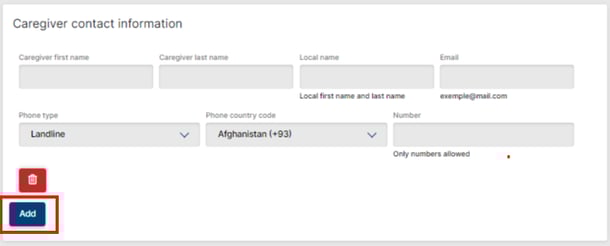
4. Update the Patient file
**[Back to Top](https://support.axiosint.com/knowledge/patient-creation#top)**
---
### Allocating a treatment to your Patient
1. View/Edit your Patient
2. In the Information tab, scroll to “Treatment”
3. Select the hospital where the Patient is or will be treated (referring hospital)
1. Only Health Centers located in the Program country will be available
4. Select your Program
5. Select the referring Physician
1. Only a Physician with the same specialty as your Program’s combination will allow you to allocate this Patient to your Program
6. Select the appropriate Indication and Prescription
7. Choose the appropriate dosage of medication for the initial treatment, considering the total daily dose. If the Program involves a combination of two medicines, also include a second dose.
8. Update the Patient file
**Related Article**
Learn more on how the treatment is configured at program level by checking the [Treatment Configuration](https://support.axiosint.com/knowledge/treatment-configuration?hsLang=en) article.
**[Back to Top](https://support.axiosint.com/knowledge/patient-creation#top)**
---
### Previous Treatment
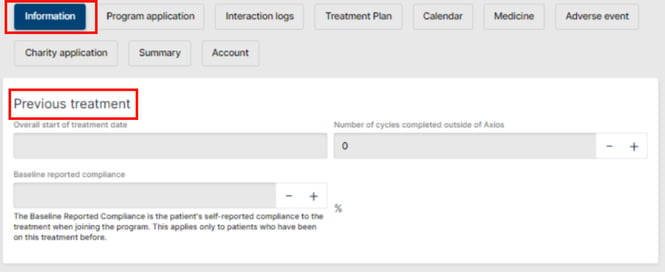
To fully understand the patient journey, we can keep track of when the patient started on the treatment (“Overall start of treatment date”) in case they started before joining the program.
We can also keep track of how many cycles they have completed outside of Axios and of the Baseline Reported Compliance self-reported by the patient (only if patient was on the same treatment prior to starting with Axios).
**[Back to Top](https://support.axiosint.com/knowledge/patient-creation#top)**
---
### Insurance/Financial Situation
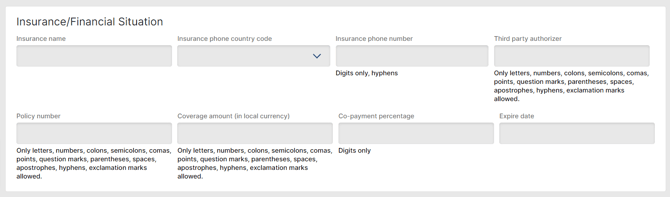
Patient's insurance and financial situation situation can be captured in this section. None of these fields are mandatory.
**[Back to Top](https://support.axiosint.com/knowledge/patient-creation#top)**
---
### Patient Management

Here is assigned the person responsible for this patient. This is important for program management. In the list are only available users that have access to this program.
**[Back to Top](https://support.axiosint.com/knowledge/patient-creation#top)**
---
### Program Services
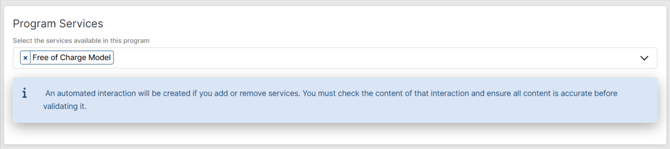
Services are defined at the program level and subservices can be tagged at the patient level to differentiate between patients (for example: FOC scheme vs Voucher scheme).
**Related Article**
Learn more about **services and subservices** in the [Services and Subservices](https://support.axiosint.com/knowledge/services-and-subservices?hsLang=en) article.
**[Back to Top](https://support.axiosint.com/knowledge/patient-creation#top)**
---
**Going Further**
Once your patient is created, you can start the **application process** and have a **Treatment Plan** assigned to your patient. Make sure to check the [Patient Applications Steps](https://support.axiosint.com/knowledge/patient-application?hsLang=en) and the [Manage a Patient’s treatment plan](https://support.axiosint.com/knowledge/manage-a-patients-treatment-plan?hsLang=en) articles to learn more about these topics.
- [PMS User Guide](https://support.axiosint.com/knowledge/pms-user-guide?hsLang=en#main-content)
- [Glossary & Definitions](https://support.axiosint.com/knowledge/pms-user-guide?hsLang=en#glossary-definitions)
- [General Knowledge](https://support.axiosint.com/knowledge/pms-user-guide?hsLang=en#general-knowledge)
- [Program Configuration](https://support.axiosint.com/knowledge/pms-user-guide?hsLang=en#program-configuration)
- [Program Management](https://support.axiosint.com/knowledge/pms-user-guide?hsLang=en#program-management)
- [Patient Management](https://support.axiosint.com/knowledge/pms-user-guide?hsLang=en#patient-management)
- [Entity Management](https://support.axiosint.com/knowledge/pms-user-guide?hsLang=en#entity-management)
- [Axios+ User Guide](https://support.axiosint.com/knowledge/axios-user-guide?hsLang=en#main-content)
- [MyPrograms](https://support.axiosint.com/knowledge/axios-user-guide?hsLang=en#myprograms)
- [MyPatients](https://support.axiosint.com/knowledge/axios-user-guide?hsLang=en#mypatients)
- [MyHealth](https://support.axiosint.com/knowledge/axios-user-guide?hsLang=en#myhealth)
- [MyHealth (v2)](https://support.axiosint.com/knowledge/axios-user-guide?hsLang=en#myhealth-v2)
- [MyPharmacy (Mobile App)](https://support.axiosint.com/knowledge/axios-user-guide?hsLang=en#mypharmacy-mobile-app)
- [MyPharmacy (Desktop App)](https://support.axiosint.com/knowledge/axios-user-guide?hsLang=en#mypharmacy-desktop-app)
- [Digital University Sessions](https://support.axiosint.com/knowledge/digital-university-sessions?hsLang=en#main-content)
- [Season 1](https://support.axiosint.com/knowledge/digital-university-sessions?hsLang=en#season-1)
- [Season 2](https://support.axiosint.com/knowledge/digital-university-sessions?hsLang=en#season-2)
- [Season 3](https://support.axiosint.com/knowledge/digital-university-sessions?hsLang=en#season-3)
- [Season 4](https://support.axiosint.com/knowledge/digital-university-sessions?hsLang=en#season-4)
- [Season 5](https://support.axiosint.com/knowledge/digital-university-sessions?hsLang=en#season-5)
- [Season 6](https://support.axiosint.com/knowledge/digital-university-sessions?hsLang=en#season-6)
- [Season 7](https://support.axiosint.com/knowledge/digital-university-sessions?hsLang=en#season-7)
- [FAQ PMS](https://support.axiosint.com/knowledge/faq-pms?hsLang=en#main-content)
- [Access Management](https://support.axiosint.com/knowledge/faq-pms?hsLang=en#access-management)
- [Data, Statistics and Reporting](https://support.axiosint.com/knowledge/faq-pms?hsLang=en#data-statistics-and-reporting)
- [Entity Management](https://support.axiosint.com/knowledge/faq-pms?hsLang=en#entity-management)
- [Patient Management](https://support.axiosint.com/knowledge/faq-pms?hsLang=en#patient-management)
- [Program Management](https://support.axiosint.com/knowledge/faq-pms?hsLang=en#program-management)
- [Treatment Management](https://support.axiosint.com/knowledge/faq-pms?hsLang=en#treatment-management)
- [FAQ Axios+](https://support.axiosint.com/knowledge/faq-axios?hsLang=en#main-content)
- [General](https://support.axiosint.com/knowledge/faq-axios?hsLang=en#general)
- [General - Account Creation and Management](https://support.axiosint.com/knowledge/faq-axios?hsLang=en#general-account-creation-and-management)
- [General - App Installation and Features](https://support.axiosint.com/knowledge/faq-axios?hsLang=en#general-app-installation-and-features)
- [MyHealth](https://support.axiosint.com/knowledge/faq-axios?hsLang=en#myhealth)
- [MyHealth (Adherence)](https://support.axiosint.com/knowledge/faq-axios?hsLang=en#myhealth-adherence)
- [MyPatients](https://support.axiosint.com/knowledge/faq-axios?hsLang=en#mypatients)
- [MyPharmacy](https://support.axiosint.com/knowledge/faq-axios?hsLang=en#mypharmacy)
- [MyPrograms](https://support.axiosint.com/knowledge/faq-axios?hsLang=en#myprograms)
- [FAQ Digital Knowledge](https://support.axiosint.com/knowledge/faq-digital-knowledge?hsLang=en#main-content)
- [Technical Knowledge](https://support.axiosint.com/knowledge/faq-digital-knowledge?hsLang=en#technical-knowledge)
- [Security Best Practices](https://support.axiosint.com/knowledge/faq-digital-knowledge?hsLang=en#security-best-practices)
- [Internal Processes](https://support.axiosint.com/knowledge/internal-processes?hsLang=en#main-content)
- [Process Sheet](https://support.axiosint.com/knowledge/internal-processes?hsLang=en#process-sheet)
- [Technical Documentation](https://support.axiosint.com/knowledge/internal-processes?hsLang=en#technical-documentation)
- [Generative AI](https://support.axiosint.com/knowledge/internal-processes?hsLang=en#generative-ai)
[](http://axiosint.com)
Axios Digital University
Copyright © 2026, Axios International
```json
{
"@context" : "https://schema.org",
"@type" : "VideoObject",
"contentUrl" : "https://26529813.fs1.hubspotusercontent-eu1.net/hubfs/26529813/Patient-creation-01.webm",
"dateModified" : "2023-09-14T12:13:58.775Z",
"duration" : "PT52.485S",
"height" : 539,
"name" : "Patient-creation-01",
"thumbnailUrl" : "https://26529813.fs1.hubspotusercontent-eu1.net/hubfs/26529813/Patient-creation-01.webm/medium.jpg",
"uploadDate" : "2023-08-04T09:51:50.207Z",
"width" : 1250
}
```
```json
{
"@context" : "https://schema.org",
"@type" : "VideoObject",
"contentUrl" : "https://26529813.fs1.hubspotusercontent-eu1.net/hubfs/26529813/Patient-creation-02.webm",
"dateModified" : "2023-09-14T12:13:59.413Z",
"duration" : "PT38.949S",
"height" : 526,
"name" : "Patient-creation-02",
"thumbnailUrl" : "https://26529813.fs1.hubspotusercontent-eu1.net/hubfs/26529813/Patient-creation-02.webm/medium.jpg",
"uploadDate" : "2023-08-04T12:26:41.885Z",
"width" : 1250
}
```
```json
{
"@context" : "https://schema.org",
"@type" : "VideoObject",
"contentUrl" : "https://26529813.fs1.hubspotusercontent-eu1.net/hubfs/26529813/Patient-creation-03.webm",
"dateModified" : "2023-09-14T12:14:00.127Z",
"duration" : "PT28.132S",
"height" : 526,
"name" : "Patient-creation-03",
"thumbnailUrl" : "https://26529813.fs1.hubspotusercontent-eu1.net/hubfs/26529813/Patient-creation-03.webm/medium.jpg",
"uploadDate" : "2023-08-04T12:33:28.631Z",
"width" : 1241
}
```
```json
{
"@context" : "https://schema.org",
"@type" : "VideoObject",
"contentUrl" : "https://26529813.fs1.hubspotusercontent-eu1.net/hubfs/26529813/Patient-creation-04.webm",
"dateModified" : "2023-09-14T12:14:00.864Z",
"duration" : "PT26.062S",
"height" : 528,
"name" : "Patient-creation-04",
"thumbnailUrl" : "https://26529813.fs1.hubspotusercontent-eu1.net/hubfs/26529813/Patient-creation-04.webm/medium.jpg",
"uploadDate" : "2023-08-04T12:36:06.688Z",
"width" : 1248
}
```