
Whats is the Patient's Calendar?
The calendar is used to configure events and provide reminders to the patient via the MyHealth application. Events can be unspecified Events, Follow-ups, Reminders, Appointments or Activities. The patient's treatment plan is also showing in the calendar.
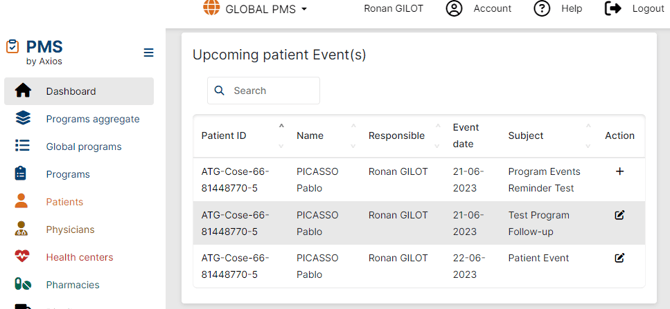
Calendar events will appear in the Dashboard under the "Upcoming patient Event(s)" section, 7 days prior to the event.
How to add an event to the patient's calendar
-
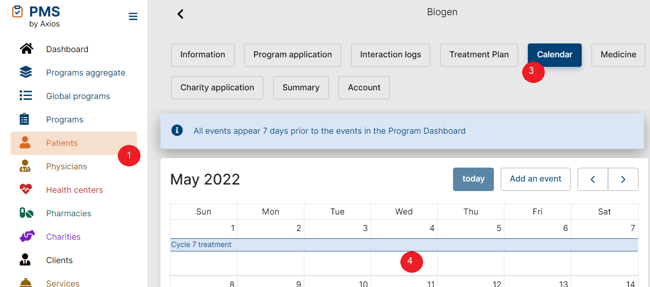
Navigate to Patients
-
Manage/Edit your Patient
-
Open the Calendar tab
-
Click on the date of the event
-
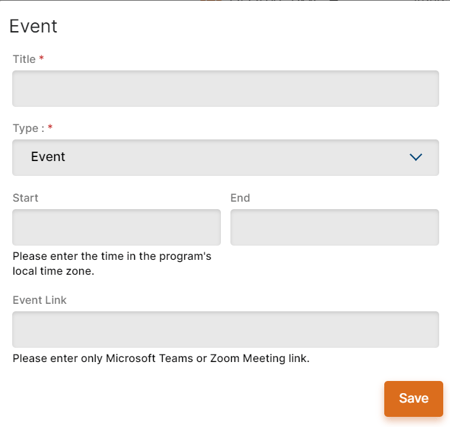
Input title, select the type of event, the start and end date
-
Add any relevant note for this event
-
Save
Did you Know?
 Calendar events are different from Events set at program level. To learn more about Events configuration in Program Settings, refer to the Events article.
 Going Further
Learn more on how to leverage the calendar for your Dashboard by checking our Navigating your Dashboard article.