
All Adverse Events must be reconciled on a monthly basis, at program level. This is a second layer of verification to make sure that all the Adverse Events have been reported and confirmed by the client for a specific program and during a specific month. A client confirmation document must be uploaded along with the validation of the reconciliation. Once reconciled, the Adverse Event list can be exported in CSV format.
Creating an Adverse Event Reconciliation for your program
In programs > data, go to the AE Reconciliation tab. Select "+ Add AE Reconciliation".
Select the month for which you want the AE Reconciliation to be created. The list shows each month, and specifies if no Adverse Event has been reported for a specific month. Select the wanted month and click on Create to open the Adverse Event reconciliation page.
The AE Reconciliation page displays the following information:
-
Adverse Events: this is the list of all confirmed Adverse Events for the selected month
-
Documents: this is where you can upload the client confirmation document, or any other documents that may be relevant
-
Confirmation: this is were you validate the reconciliation, adding the reconciliation date and clicking on "I validate this reconciliation"
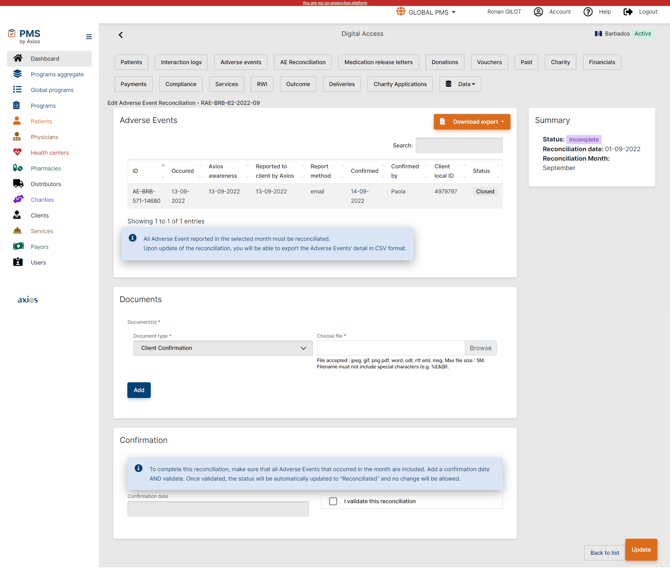
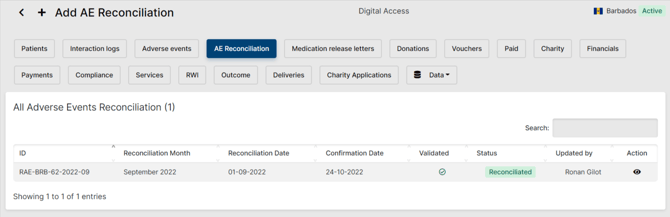
Once you have verified that all Adverse Events were displayed in the list, uploaded the client confirmation document and validated the reconciliation, the status will change from "Incomplete" to "Reconciliated", and the reconciliation will appear in the list under the AE Reconciliation tab.
 IMPORTANT
-
Only closed Adverse Events appear in the Adverse Event list. If an Adverse Event is missing, it is probably because it hasn't been closed under the patient's Adverse Event tab.
-
If no Adverse Event occurred during a specific month, a check should be conducted to confirm that there were no Adverse Events in that month. If no AE have occurred, reconciliation still needs to be conducted.
Going Further
 Learn more about Adverse Events and how to capture them in the PMS by checking the Interaction Logs (ILs), Adverse Events (AE) and Patient Summary article.