
Record the submission to a Charity
Should your Program allows for Charities (see Local Program Configuration), you will be able to assign Charity MedPacks to your Patient’s Treatment Plan.
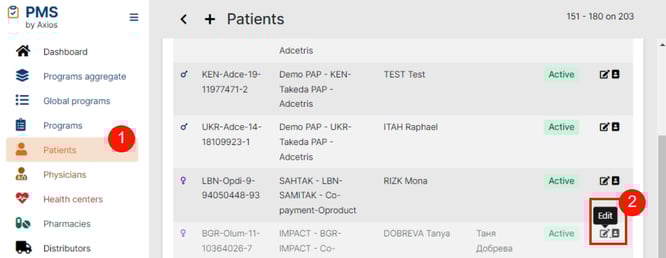
To release the medication, a Patient will need to apply to the Charity and fulfill the eligibility criteria. To record the submission (and later, approval or rejection) to a Charity, you should:
-
Navigate to Patients
-
Manage/Edit your Patient
-
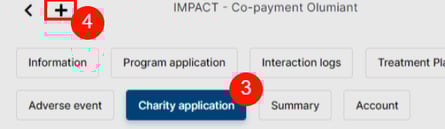
Open the Charity Application tab
-
Add a new Charity application
-
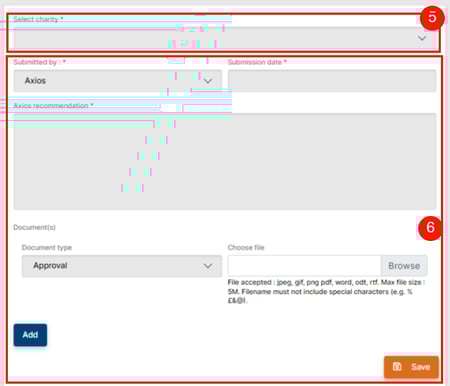
Select the appropriate Charity
-
Make sure to create your Charity ahead of these steps
-
-
Fill in the fields and save
 Related Article
Learn how to create a Charity in the Charity Creation article.
The discussions and alignment with the Charity is happening outside of the PMS. You should check with your contact there or your Patient if they applied on their own to follow-up on the application and record every interaction in the Patient’s interaction logs.
Once you receive the result of the application, you should go back to your Patient application to report the approval or rejection (and the supporting documents and appropriate dates).
 Going Further
Learn more about Treatment Plans in the About Standard Treatment Plan article.
Learn more about MedPack dispensing in the MedPack release article.