
What are Events?
At program level, it is possible to configure regular reminders for your patients. These will show in the patients calendar, and will show in your dashboard under Upcoming Patient Event(s) or Program Event(s), depending on the type of event selected. These will apply to all patients in the program (except for program events where you can select attendees).
 Did you know?
Events set at program level are different from Patient Calendar Events. For more information about this functionality, refer to the Patient's Calendar article.
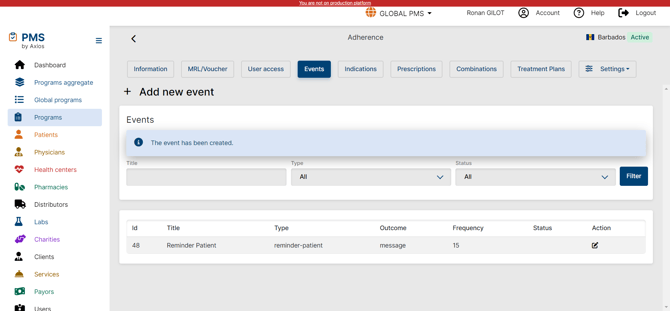
Create a new event
In Program settings > Events, + add New Event
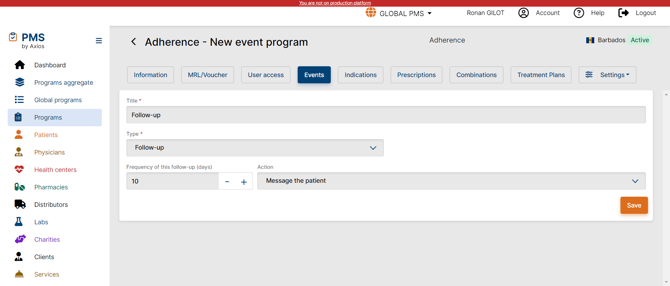
- Add a title
- Select the type of event
- Adjust the Frequency (in days)
- Select the type and action you want to trigger
Event types
- Reminder Patient
- Reminder Axios
- Follow-up
- Automation
- Program Event
Event Actions
- Make an appointment
- Message the patient
- Send MRL / Voucher to Patient
- Send MRL / Voucher to Pharmacy
- Reminder patient push notification MedPack available
Program Event
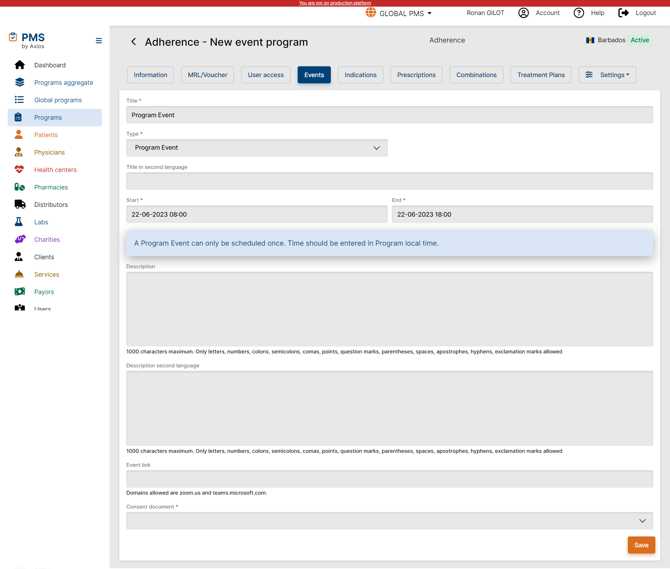
You can schedule a program-wide event to which patients can attend by selecting “Program Event” as event type. The program event will then appear in your dashboard in the “Program Event(s)” section.
 IMPORTANT
You will have to select a consent document to be able to save the program event. This document has to be uploaded in the program content (selecting the Consent document type) prior to creating the program event to have it available in the dropdown.
Once the Program Event is saved, you will be able to add attendees. For each attendee added, and also in case of attendee removal, an automated interaction is generated and will have to be manually validated.
 Going Further
Learn more about Program settings and configuration in tour dedicated articles Local Program Configuration, Treatment Configuration and Program Content Configuration