
Introduction
The MyHealth mobile application is available for patients enrolled in Axios-managed programs across the world.
It allows patients to take control of their treatment journey by making it simple to track and manage their treatment supported by an Axios-managed Patient Support Program.
MyHealth is available on iOS and Android.
Setting up access for your patient
-
Navigate to Patients > Information
-
Enter the patient’s email and Save
-
Open the ACCOUNT tab
-
Make sure to tick the checkbox “Account enabled”
-
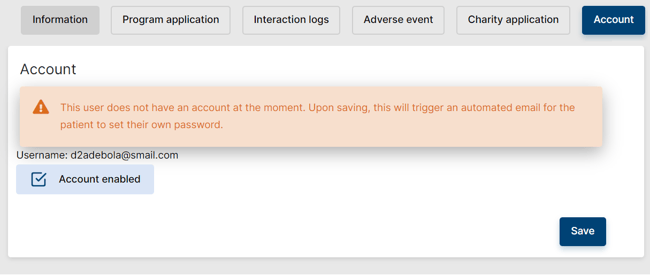
If the red disclaimer “This user does not have an account at the moment. Upon saving, this will trigger an automated email for the patient to set their own password.” displays, the patient’s account is not enabled yet. Upon saving, an email will be sent to set his password.
-
-
Save
Once the patient’s account is enabled, the PMS will automatically send an email to the patient for them to set their own password. In that email, the links to the apps in the Google Play Store and Apple Store will also be available.
 IMPORTANT
Note that the patient is also consenting to Axios Privacy Policy by downloading the app.
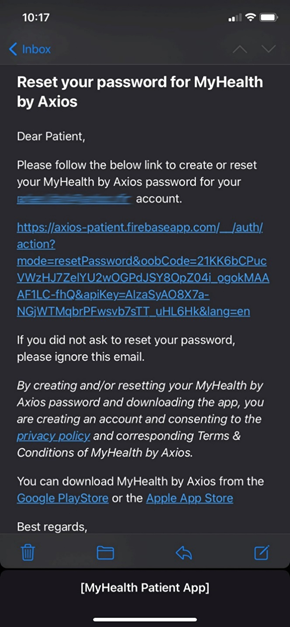
Once the patient has set his own password, he can download the application from the store and log in. His username will be its email address, and his password the one he has just set.
Reset the patient’s password
If patient ever forget his password, he can avail of the “Forget Password” button on the landing screen of the app. This will trigger an automatic email to reset the password.
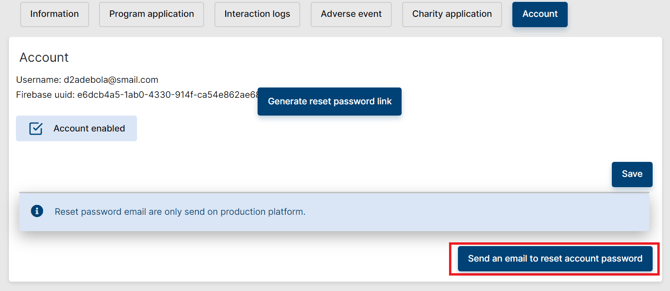
Alternatively, Axios can trigger an automatic email from the patient’s ACCOUNT tab in the PMS:
IMPORTANT
The link in the reset email is only valid for one hour. After that delay is past, a new reset email will be needed.
IMPORTANT
A patient can only have one email address associated with his account. In case the patient must change his email account to use the app, please contact pms.support@axiosint.com to assist with the change.
Account Transfer
In the case your patient is referred to a new program and already has an account, you may need an account transfer from the previous program to the new one. Contact PMS Support providing the patient ID linked to the original program and the new patient ID, and we will make the switch for you.
Note: Make sure that patient information is matching perfectly between the two IDs.
How to use MyHealth
A dedicated user guide is available here, and a quick introduction video is available here. These materials can be shared with the patient to better understand how the app works.
 Related Article
Digital University session recordings are available for more information on MyHealth (Access) & MyHealth (Adherence)
 Going Further
Learn more about the MyHealth application by checking our dedicated articles: